
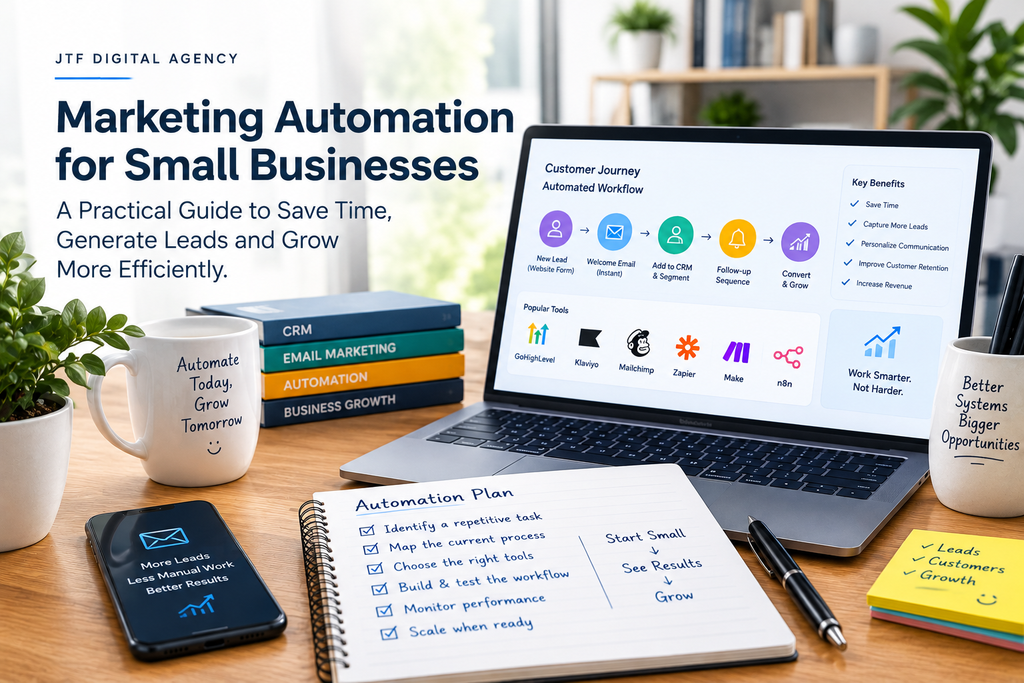
As a business grows, managing marketing manually becomes increasingly difficult.
Your team may need to respond to enquiries, update customer records, send emails, follow up with prospects, organize campaign data, and track sales opportunities. When these tasks are handled separately, important details can be missed and valuable time can be spent on repetitive work.
Marketing automation helps businesses manage these activities through predefined workflows and connected systems.
Instead of manually performing every task, you can create processes that respond to specific events, such as a new enquiry, a newsletter subscription, or a completed purchase.
When implemented thoughtfully, marketing automation can improve consistency, support better customer experiences, and give your team more time to focus on meaningful work.
What Is Marketing Automation?
Marketing automation is the use of software and automated workflows to perform recurring marketing activities with limited manual intervention.
Depending on the tools involved, it can help businesses manage email campaigns, segment contacts, score leads, send follow-up messages, update customer records, and track interactions across different channels.
For example, when someone submits an enquiry form on your website, an automated workflow could:
- Add the contact to your CRM.
- Send an acknowledgement email.
- Notify the appropriate team member.
- Create a follow-up task.
- Update the lead’s status when the next step occurs.
This creates a more organized process than relying on someone to remember every action.
Marketing automation does not mean removing people from customer relationships. It means using technology to handle predictable tasks while leaving complex conversations, decisions, and relationship-building to people.
7 Benefits of Marketing Automation for Small Businesses
1. Faster Lead Follow-Up
A potential customer may contact several businesses before deciding whom to hire. Delayed responses can make it harder to keep their attention.
Automation can send an immediate acknowledgement, assign the enquiry to a team member, and create a reminder for follow-up.
This does not replace a thoughtful human response, but it helps ensure that enquiries enter a consistent process.
2. More Consistent Email Marketing
Sending emails manually to every subscriber can become difficult as your list grows.
Automated email sequences can welcome new subscribers, share educational content, introduce relevant offers, and follow up after purchases.
For example, a consulting business might send a welcome email immediately after someone downloads a guide, followed by useful educational emails over the next several days.
Messages should reflect the subscriber’s interests and permissions. Give recipients appropriate control over their subscriptions and avoid sending unnecessary messages.
3. Better Lead Management
Without a structured system, sales leads can become scattered across spreadsheets, inboxes, social media messages, and different team members’ notes.
A CRM system helps centralize contact information, interactions, tasks, and sales stages.
Automation can then update records, assign leads, and notify staff when a prospect needs attention.
This gives teams a clearer view of which opportunities are new, which need follow-up, and which are progressing toward a sale.
4. More Relevant Customer Communication
Not every customer needs the same message.
Segmentation allows businesses to organize audiences based on appropriate information, such as interests, previous purchases, service requirements, or stage in the customer journey.
Automation can use these segments to deliver more relevant messages.
For instance, an ecommerce store might send product-care instructions to recent buyers while sending a different campaign to subscribers who have not purchased.
Personalization should be useful, respectful, and consistent with the data customers have agreed to share.
5. Less Repetitive Administrative Work
Automation can connect marketing tools with CRMs, spreadsheets, databases, and other business applications.
A new lead could automatically create a CRM record, update a reporting sheet, notify a sales representative, and initiate an approved follow-up sequence.
Platforms such as Make, Zapier, and n8n can help connect supported applications and create multi-step workflows.
The biggest benefit is not simply the number of automated tasks. It is reducing unnecessary handoffs, duplicate data entry, and avoidable mistakes.
6. Improved Campaign Measurement
Marketing automation can help record interactions and track what happens after someone responds to a campaign.
When connected with suitable analytics and CRM systems, businesses can compare campaign activity with enquiries, sales opportunities, and purchases.
This helps answer more useful questions than “How many emails did we send?”
For example, which campaign generated qualified leads? How many of those leads became customers? Where do prospects stop responding?
Reliable tracking depends on proper setup, data quality, and clear attribution rules.
7. More Scalable Marketing Processes
A process that works for ten enquiries per week may become difficult to maintain when enquiries increase substantially.
Automation can make repeatable processes easier to manage as volume grows, provided the underlying workflow is well designed.
You should still review your workflows regularly to ensure they remain accurate, relevant, and appropriate for your customers.
Marketing Automation Examples for Different Businesses
Marketing automation is not limited to large companies. Small businesses can begin with simple workflows that address specific operational problems.
I’m glad I could be of assistance
Service-based businesses
Automatically acknowledge enquiries, assign leads to team members, send appointment reminders, and create follow-up tasks after consultations.
Updating the order details online stock photo
Ecommerce stores
Send order-related messages, welcome new subscribers, follow up on abandoned carts where permitted, and deliver relevant post-purchase communication.
Setting Up an Inbox-Integrated CRM for Small Teams Without Tech Staff
B2B companies
Organize enquiries in a CRM, notify sales representatives when leads take important actions, and schedule reminders for opportunities that need attention.
Google AI Mode Visibility Tracker | Monitor Your Brand in Google AI | Finseo
Businesses managing large amounts of data
Synchronize records between supported applications, reduce repetitive data entry, and automate routine reporting and notifications.
How to Get Started With Marketing Automation
You do not need a complicated automation system to get started. A focused workflow that solves a real problem is often more valuable than a large collection of disconnected automations.
Step 1: Identify a Repetitive Problem
Look for tasks that happen frequently and follow predictable rules.
Examples include manually sending the same acknowledgement email, copying leads between applications, assigning enquiries, or reminding staff to follow up.
Estimate how often the task occurs, how long it takes, and what happens when it is missed.
Step 2: Map the Existing Process
Before building an automation, document how the task works today.
Identify the trigger, required information, decisions, actions, exceptions, and final outcome.
For instance, a lead workflow might begin when a website form is submitted. It then validates the required details, creates or updates a contact record, assigns the lead, and notifies the appropriate person.
Mapping the process helps reveal unnecessary steps and potential failure points.
Step 3: Choose the Right Tools
Your software should fit your existing business processes, budget, and technical requirements.
Common options include:
- CRM platforms: For managing contacts, opportunities, and sales pipelines.
- Email marketing platforms: For subscriber management, campaigns, and lifecycle emails.
- Workflow automation tools: For connecting supported applications and coordinating tasks.
- Database and spreadsheet tools: For organizing structured information and reporting.
- AI-enabled tools: For selected tasks such as classifying incoming requests, summarizing information, or drafting responses that people can review.
JTF Digital’s services include CRM solutions, database management, and AI automation. The right combination depends on your specific needs; not every business requires every tool.
Step 4: Build and Test One Workflow
Start with one clearly defined use case.
Test normal scenarios and exceptions. What happens if a contact submits the form twice? What if a required field is missing? What if an integration fails? Could a customer receive duplicate messages?
Use test records where possible, and verify that information reaches the correct destination before activating the workflow for real customers.
Step 5: Monitor Performance
After launching the automation, check whether it is delivering the intended outcome.
Measure factors such as:
- Time saved on repetitive tasks.
- Lead response times.
- Completion and failure rates.
- Duplicate or incorrect records.
- Email engagement and conversions where relevant.
- Customer complaints or unsubscribe rates.
An automation that runs successfully but creates a poor customer experience is not a successful automation.
Common Marketing Automation Mistakes
Automating a Broken Process
Automation can make an inefficient process happen faster without making it better. Improve the process first, then automate the repeatable parts.
Using Too Many Tools
Adding more platforms can introduce extra costs, duplicated data, and maintenance challenges. Choose tools that integrate appropriately and have a clear purpose.
Ignoring Data Quality
Incorrect email addresses, duplicate records, inconsistent fields, and outdated information can cause workflows to fail or send inappropriate messages.
Establish rules for data entry, validation, updates, and access permissions.
Removing Human Oversight
Not every situation should trigger an automatic response. Sensitive enquiries, complaints, unusual requests, and important business decisions may require human review.
Use automation to support people, not to remove necessary judgment.
Forgetting Privacy and Security
Collect only the information you need, control who can access it, and follow applicable privacy, consent, and communication rules. Review the permissions and security settings of connected applications.
How to Measure the Return on Marketing Automation
Marketing automation should be evaluated against its costs and intended benefits.
A simple starting point is to estimate the value of time saved.
For example, suppose a workflow saves five hours each week. Over four weeks, that represents approximately 20 hours of staff time. You can compare the value of that time with the software, implementation, and maintenance costs.
However, time savings are only one possible benefit. Improved response times, fewer errors, better customer retention, and additional sales opportunities may also matter.
Track these outcomes where possible rather than assuming every automated action generates financial returns.
Final Thoughts
Marketing automation helps small businesses create more consistent processes for communicating with customers, managing leads, and coordinating everyday work.
The best approach is to begin with a clear business problem, design a simple workflow, test it thoroughly, and measure the results. Expand only when the initial process is reliable and delivering value.
Ready to simplify your marketing and business workflows? Visit JTF Digital Agency to explore CRM, database management, and AI automation solutions that can help your business work more efficiently.